
Know who clocked in. Know what needs checking before payroll.
Capture time in the way that fits each team, mobile, tablet, browser, QR, NFC, PIN, facial recognition, or connected hardware. Then compare actual attendance with the rota or working pattern, flag lateness, missed clockings, and overtime, and give managers the exceptions to review before approved hours move towards payroll.
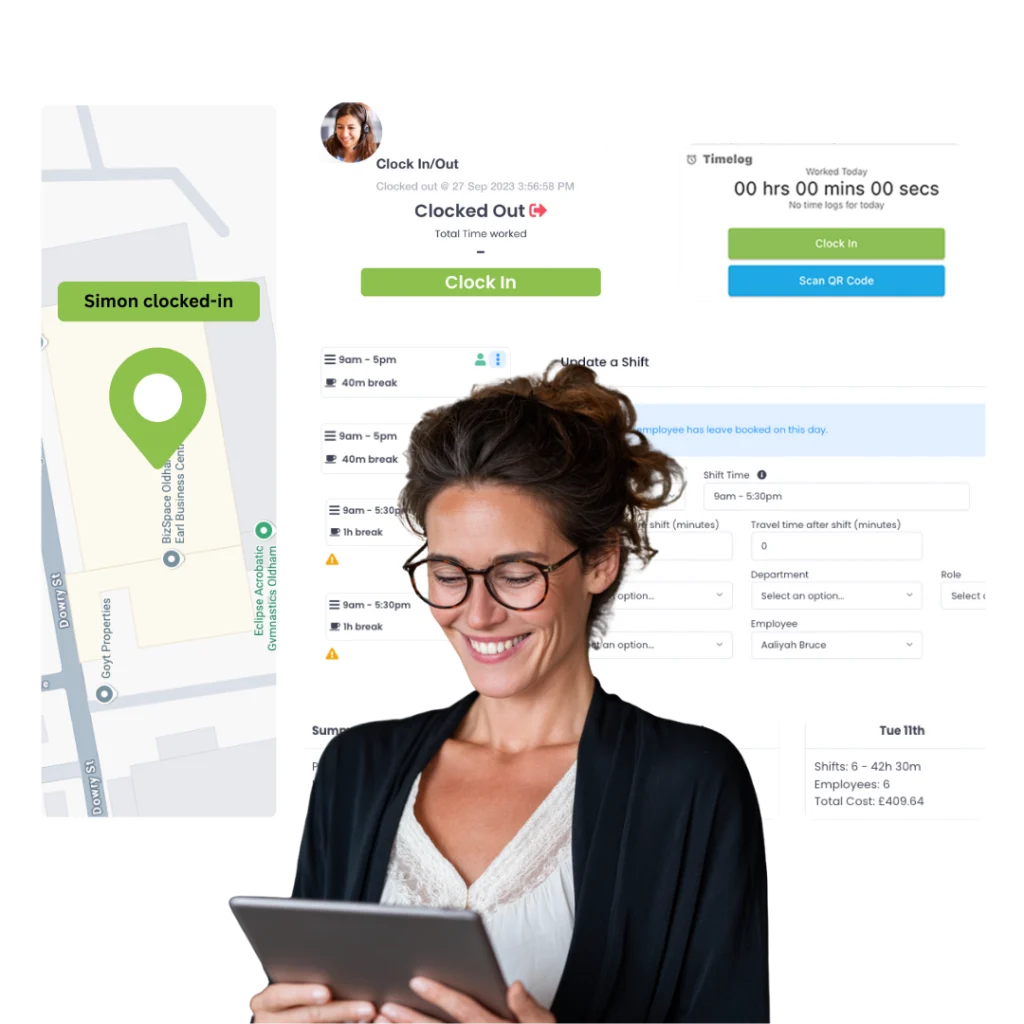
Before Evalu-8 HR managing attendance took up so much time, we were drowning in spreadsheets. Now it’s so quick and easy!”
From clocking to approved time
The clock-in is only the start.
The useful part is what happens afterwards: the system checks the entry against your rules and expected hours, flags what looks wrong, and gives the right manager something specific to review.
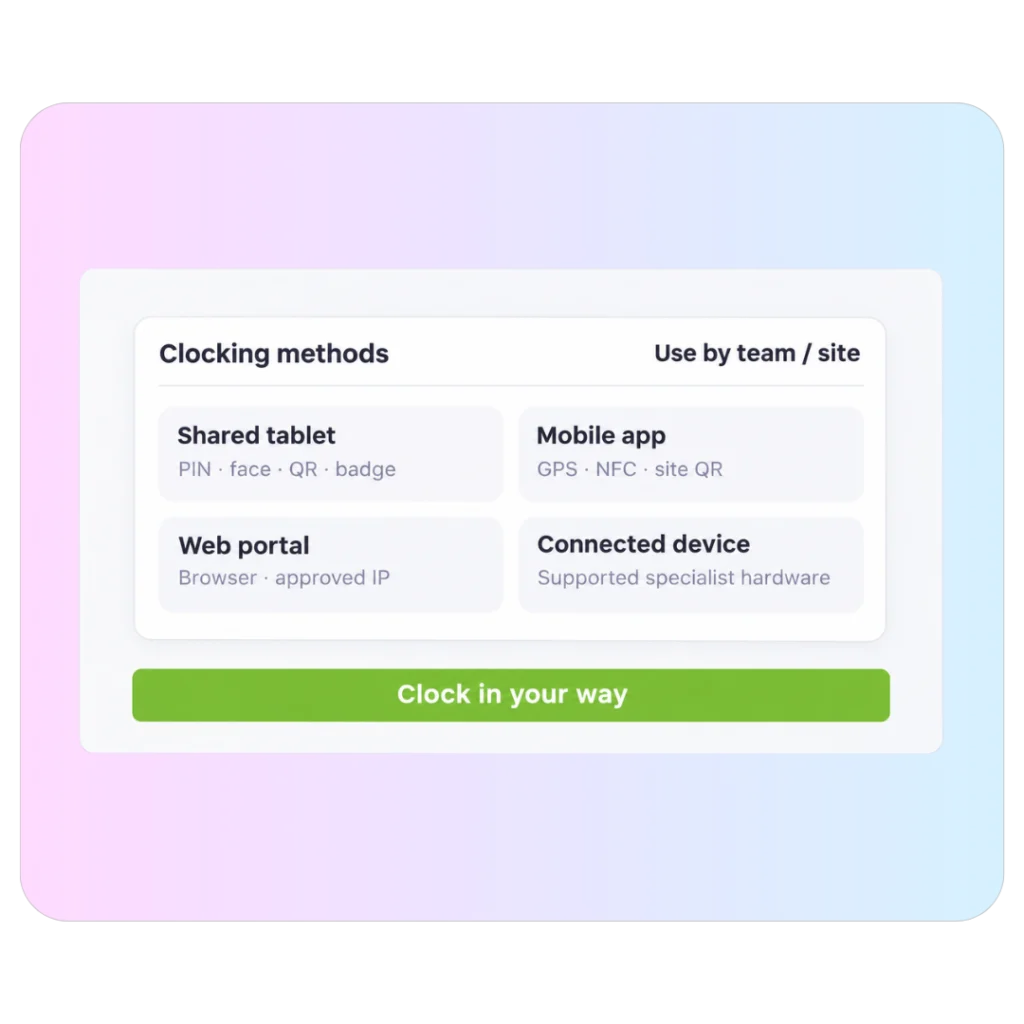
One workforce does not need one clocking method.
Use the method that fits the environment. A warehouse can use a shared tablet, engineers can clock from mobile, office teams can use the browser; and specialist sites can connect supported hardware.
- Mobile app with GPS, NFC or site-specific QR.
- Shared tablet with PIN, badge, QR or facial recognition.
- Browser clocking for desk and hybrid teams.
- Supported third-party clocking hardware through integrations.
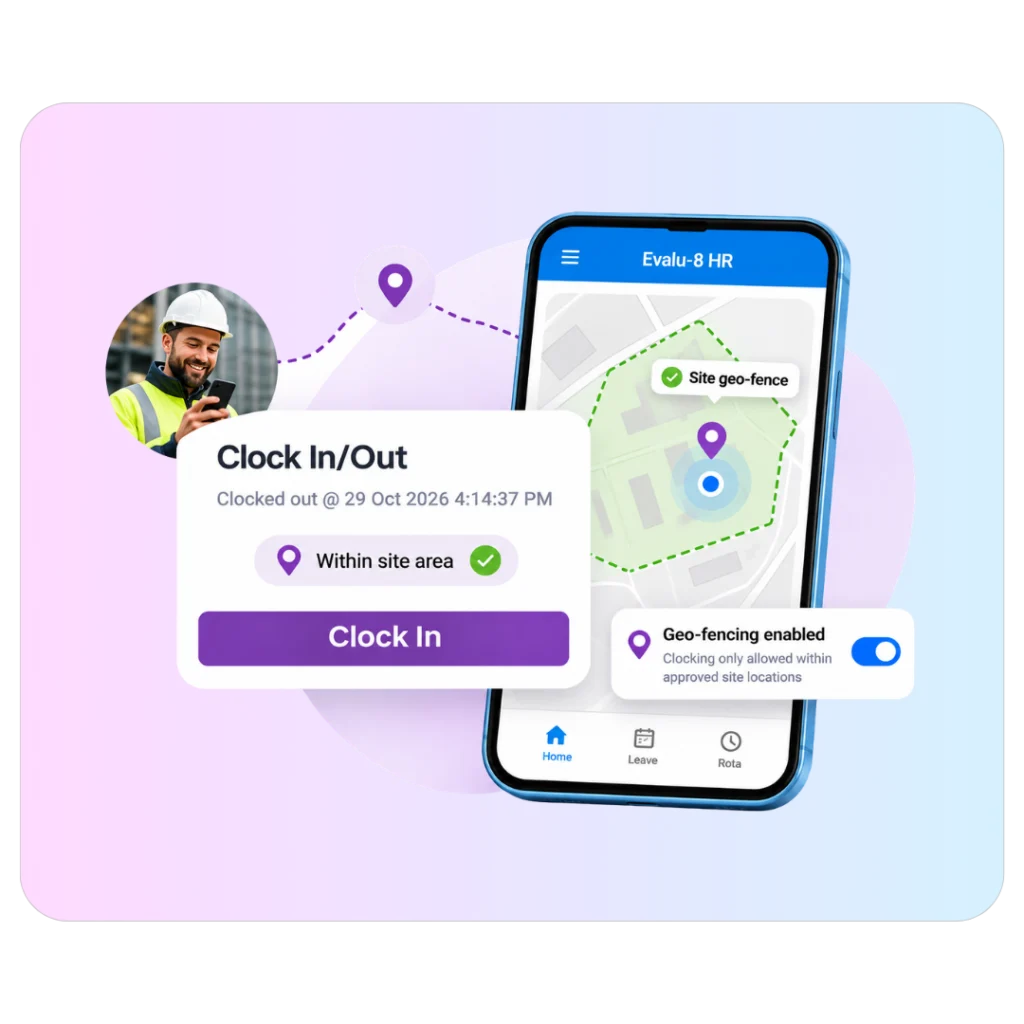
Control where, when, and how a clocking entry is accepted.
The right control depends on the site. A mobile engineer may need a geofence. An office team may need an approved IP address. A production site may need a start-time lock or tolerance window.
- Geofencing for approved GPS zones.
- IP restrictions for browser clocking.
- Tolerance windows, start-time locks and rounding rules.
- Keep location and timestamp evidence with each entry.
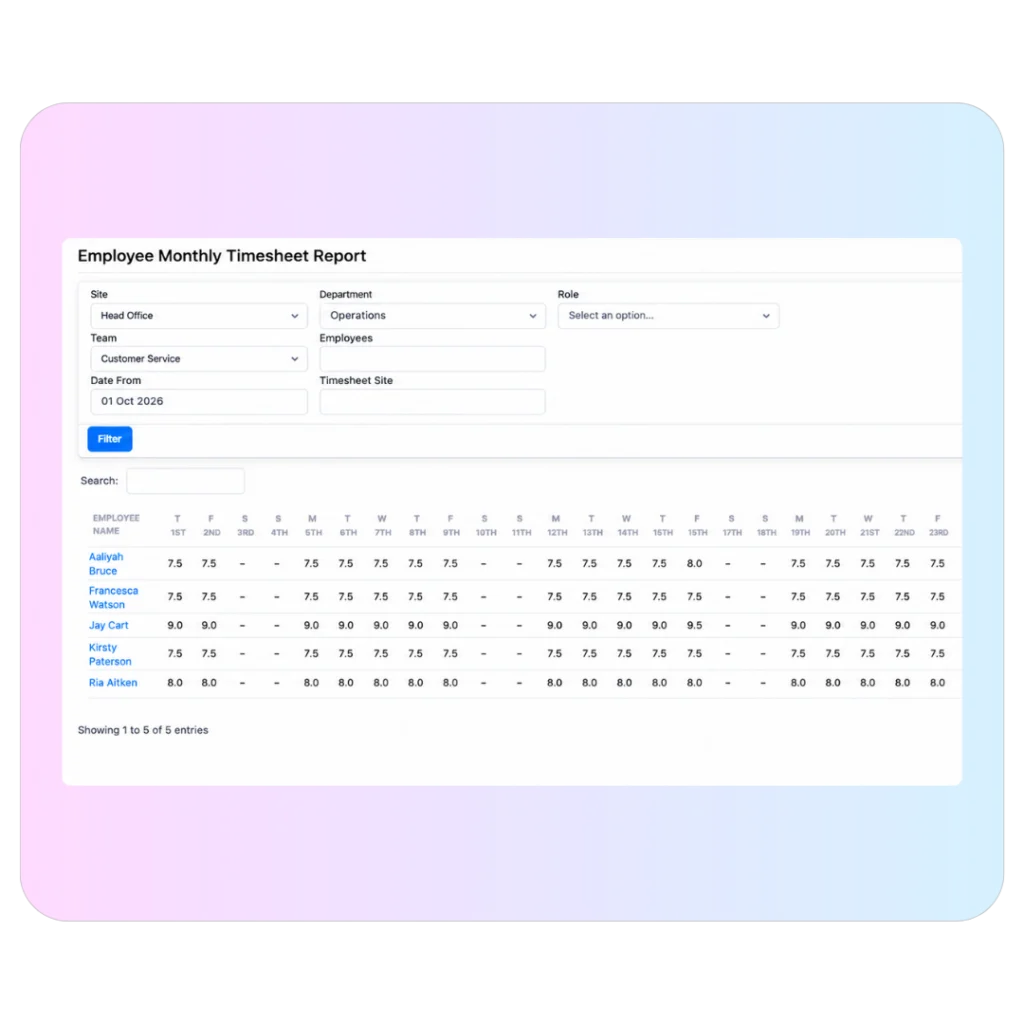
See who is in, late or still missing before somebody has to ask.
Give operational managers a live view of attendance so they can focus on the people or shifts that need attention rather than checking everybody manually.
- See current clocked-in status.
- Surface late, missing, or unusual entries.
- View clocking location where location evidence is relevant.
The rota says what should have happened. Attendance shows what actually happened.
Compare clocked time with the employee’s rota or working pattern so a manager can see the difference without manually calculating it at the end of the week.
- Compare expected and actual start / finish times.
- Support fixed, rotating, split and overnight patterns.
- Put leave and sickness into context where those records exist in Evalu-8.
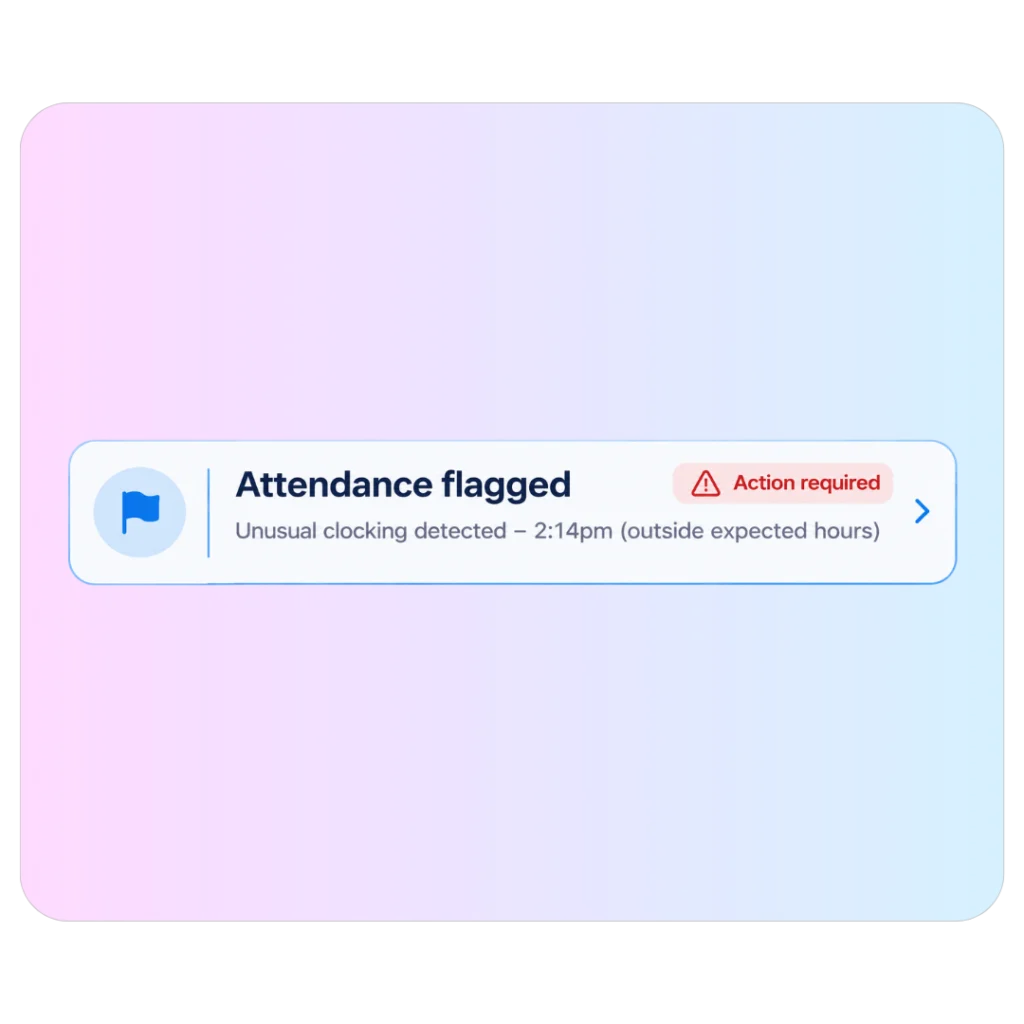
Managers should review what looks wrong, not rebuild every timesheet.
Missed clockings, lateness, unusual hours, and manual changes can be surfaced for review instead of hiding inside a long list of normal entries.
- Flag missed or unusual clockings.
- Feed late entries into lateness records where configured.
- Keep a history of edits and manager decisions.
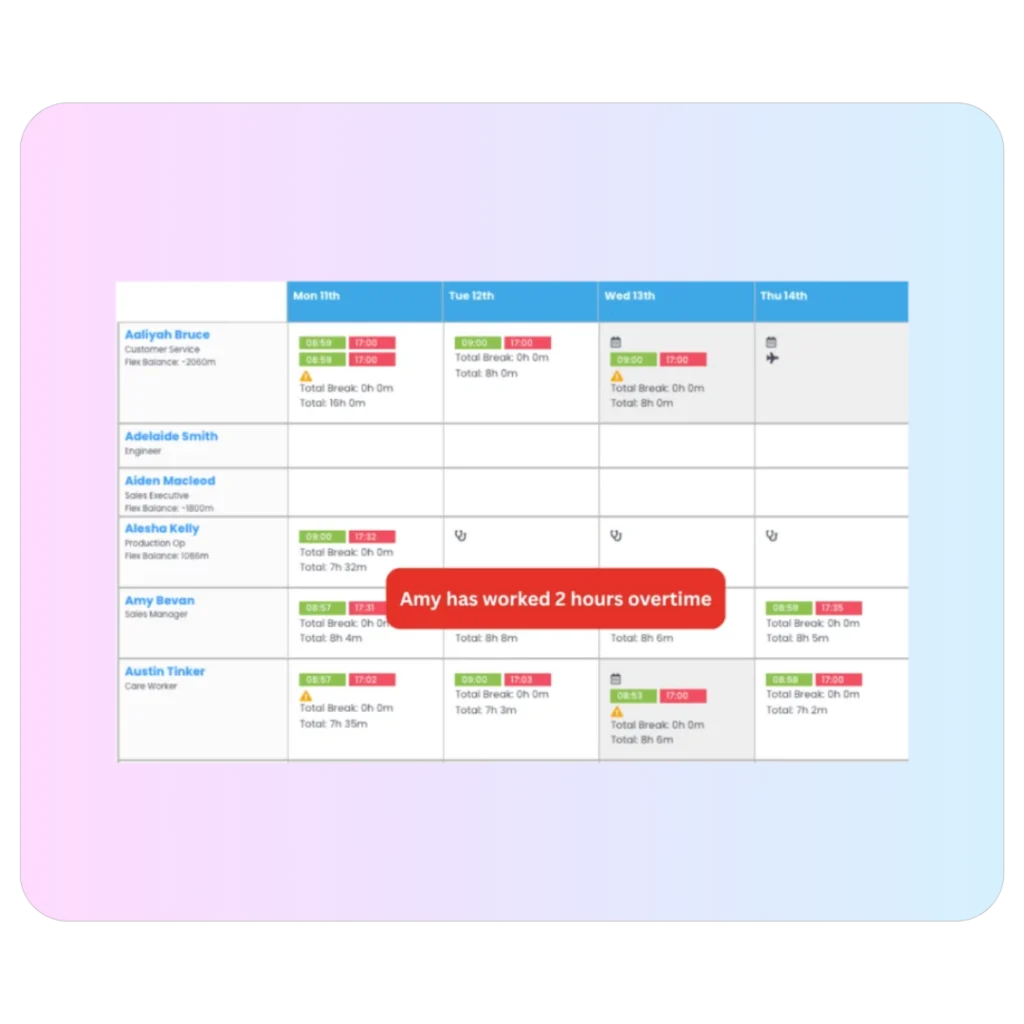
Apply the rule to the time, then let the manager decide what is valid.
Use overtime rules, thresholds, and time windows to calculate additional time consistently, while keeping approval with the manager rather than treating every extra minute as automatically payable.
- Use daily or weekly thresholds.
- Apply overtime multipliers or monetary values where configured.
- Support TOIL, flex balances, or paid overtime processes.
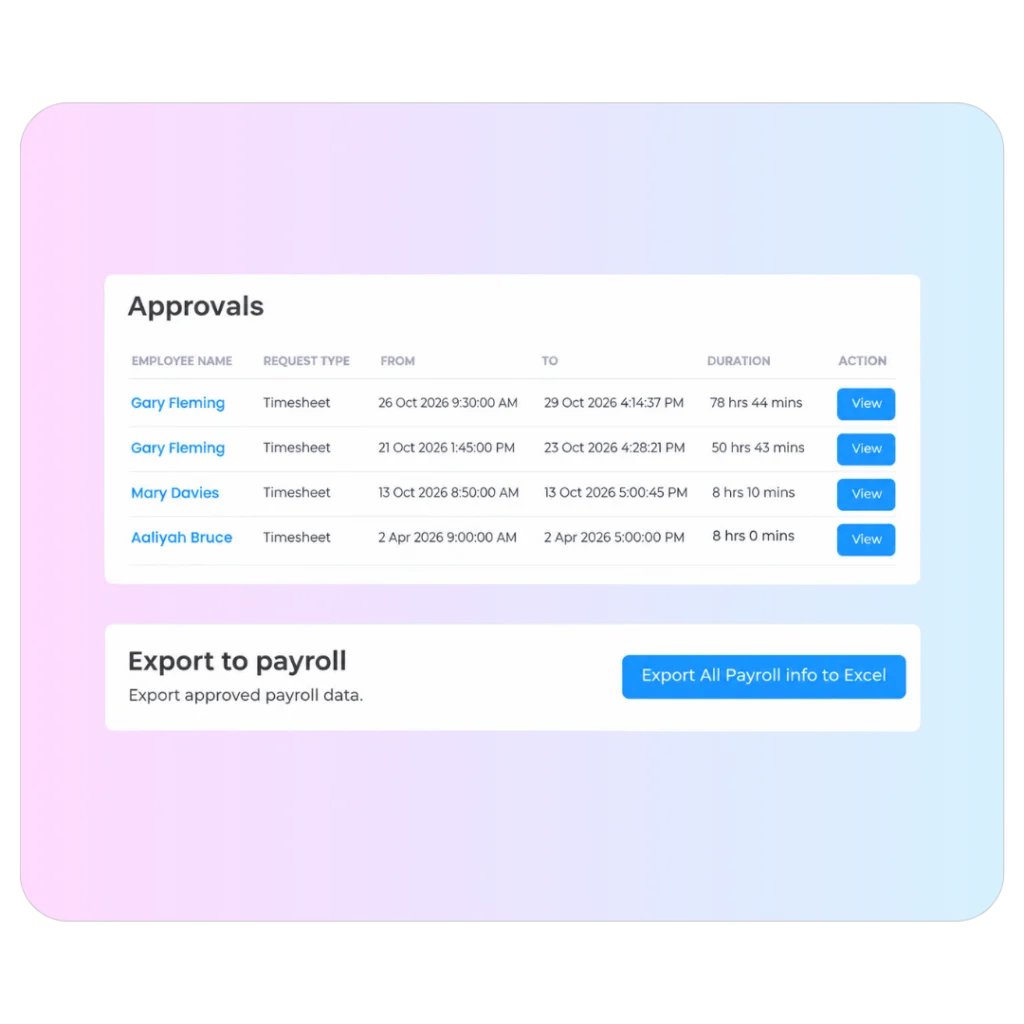
Send payroll-approved time, not a folder full of raw punches.
Managers review the exceptions, approve the hours that should move forward, and leave a clearer audit trail before the information is exported for payroll.
- Approve timesheets and attendance exceptions.
- Keep edits and decisions visible.
- Export structured, payroll-ready information.
Different clocking methods
Don’t make the warehouse, engineers, and office staff clock in the same way.
The best clocking method depends on where the employee works and what you need to verify.
A shared tablet can work on a fixed site. Mobile clocking suits field teams. Browser clocking can work for desk-based staff. Evalu-8 lets those routes feed the same attendance record.
- Use different clocking methods by team, role or site.
- Keep one attendance record behind different devices.
- Change the method without redesigning the whole attendance process.
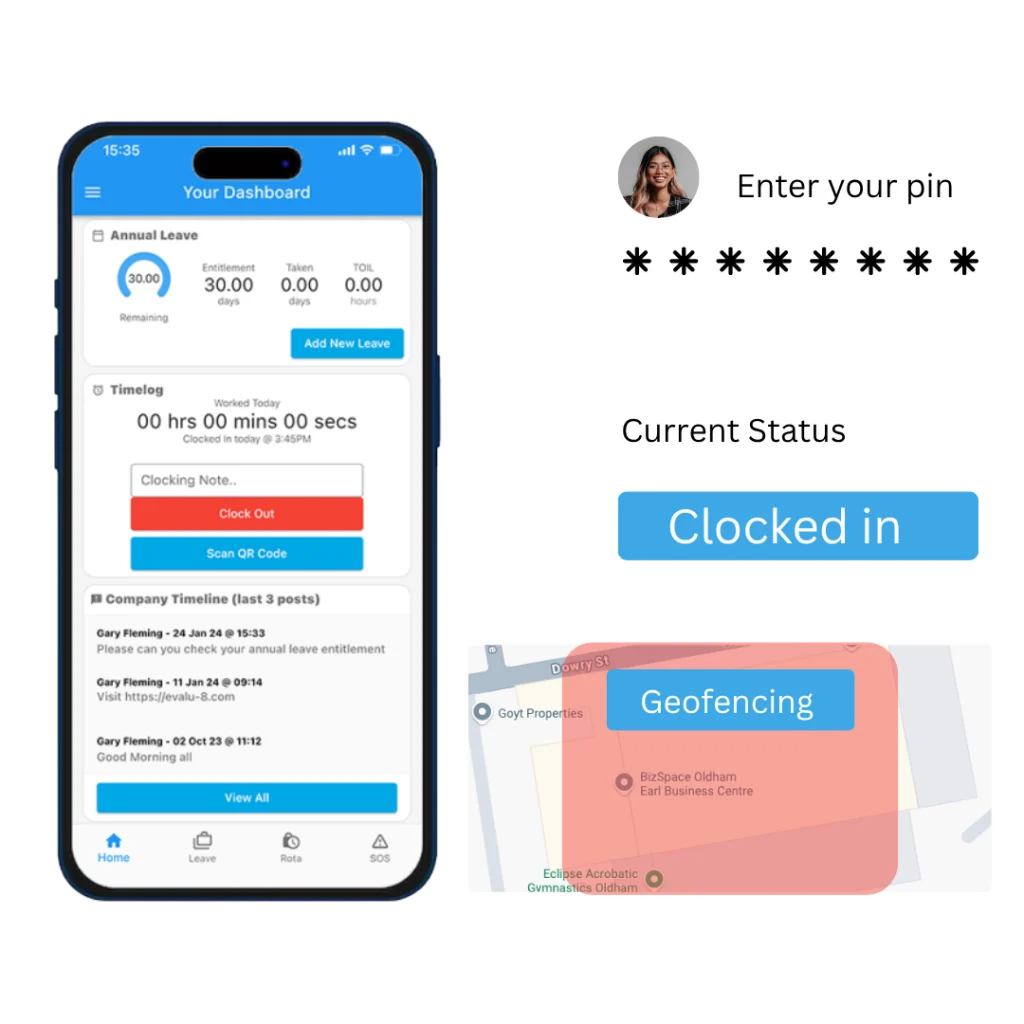
Control the clock
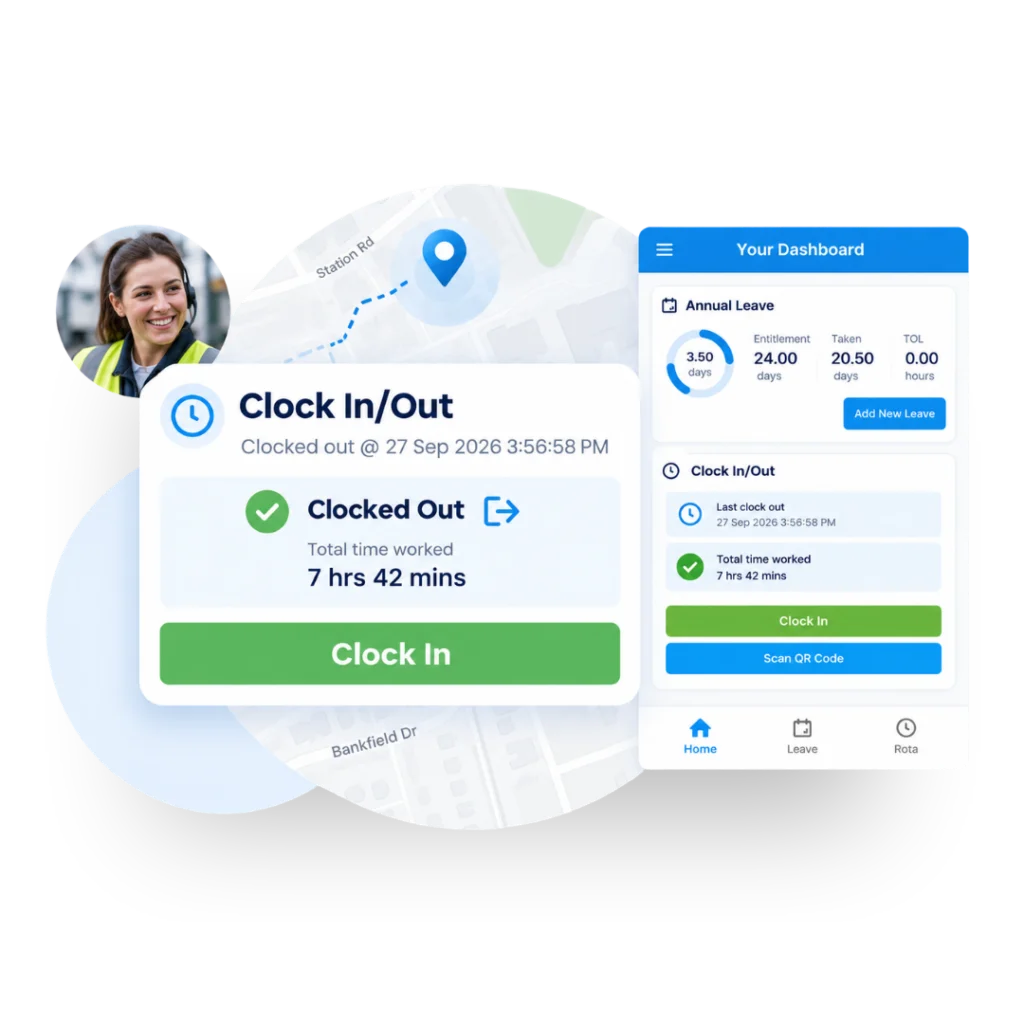
A clocking entry should tell you more than the time.
For some teams, “09:02” is enough. For others, managers need to know where the employee clocked in, whether the entry was inside an approved window, and whether the site rules were followed.
Apply controls that match the environment instead of forcing the same rule onto every employee.
- Use geofences for approved mobile clocking zones.
- Use IP restrictions for browser clocking where appropriate.
- Apply start locks, tolerance windows, and rounding rules.
Planned vs actual
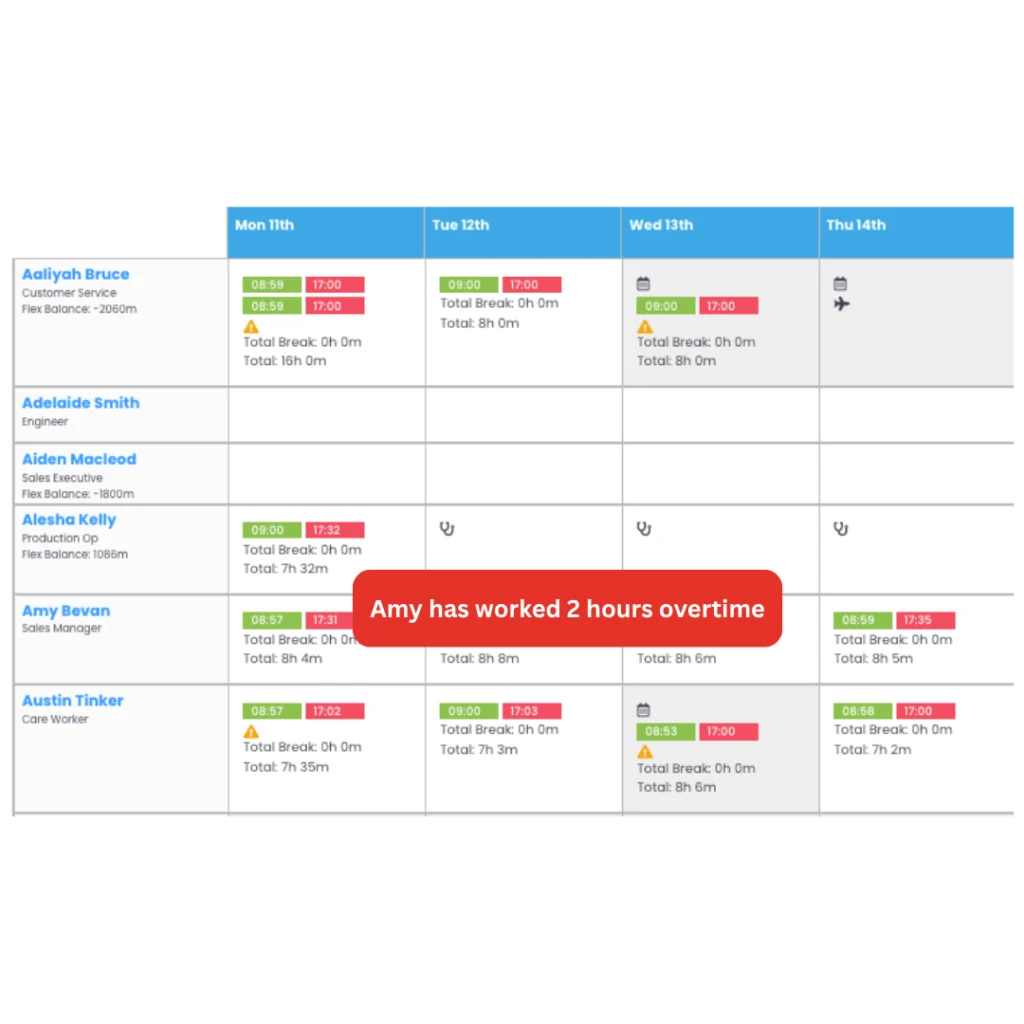
Stop checking hours without knowing what the employee was meant to work.
A raw clock-in only tells you what happened. It becomes useful when the manager can compare it with the rota, working pattern, or expected hours.
Evalu-8 brings the planned shift and the actual clocking together so lateness, extra time, and missing entries become obvious before payroll preparation.
- Compare rota or working pattern with actual attendance.
- See lateness and additional time in context.
- Keep leave and sickness alongside the employee record so missing time makes sense.
From clock-in to payroll
Raw clockings need checking before they become usable hours.
The practical workflow is simple: capture the time, apply the rules, flag the exceptions, let the manager decide, and then move approved information towards payroll.
What happened?
Capture the time and, where relevant, the location or clocking method.
Does it fit the rules?
Compare the entry with the shift, working pattern, tolerance window, and site controls.
What needs attention?
Surface lateness, missed punches, unusual hours or overtime instead of hiding them among normal entries.
What should count?
Give the responsible manager the exception, context, and decision to make.
What goes to payroll?
Move approved, structured time data forward rather than sending raw clockings for someone else to untangle.
Manager review
Payroll should not be the first place a missed clocking gets noticed.
An employee forgets to clock out. Somebody works later than planned. A shift starts seven minutes late. Those are manager decisions before they are payroll problems.
Evalu-8 gives the manager the exceptions to review and keeps the history of what changed, who approved it, and why.
- Put missed punches and unusual entries in front of the manager.
- Approve or correct time with the original context visible.
- Keep an audit trail of edits and decisions.
See it in action
See Time & Attendance through the moments managers actually deal with.
Three short scenarios that show the difference between collecting clockings and actually controlling the time process.
Time & Attendance by workforce
The right clocking process depends on where people actually work.
A factory, depot, care service, and mobile engineering team do not need the same clocking method, but managers still need the same answer: what was expected, what happened, and what needs checking?
01 Your workforce
Manufacturing
Fixed sites, shifts, overtime, and payroll checking make Time & Attendance one of the strongest operational HR use cases.
Common pressure points
- Pressure point one
- Pressure point two
What changes with Evalu-8
Capture attendance through the method that fits the site, compare it with expected hours, and give supervisors only the exceptions that need a decision.
Best-fit capabilities
- Shared tablet
- Facial recognition
- Shift comparison
- Lateness
- Overtime
- Manager approval
02 Your industry
Logistics & warehousing
Depots, shifts, overtime, and agency or temporary workers create a lot of exceptions if attendance is not checked close to the operation.
Common pressure points
- Night and rotating shifts complicate expected hours
- Missed clockings create payroll queries
- Managers need to know who is actually in now
What changes with Evalu-8
Compare the planned shift with actual attendance, flag late or missing entries, and let depot managers resolve exceptions before payroll preparation.
Best-fit capabilities
- Live attendance
- Rota comparison
- Missed punches
- Overtime
- Manager approval
Construction & field teams
Employees clock away from the office, move between customer sites, and may need location evidence behind their entries.
Common pressure points
- Clocking happens across changing locations
- Managers need confidence the entry relates to the right site
- Mobile teams cannot rely on one fixed terminal
What changes with Evalu-8
Use mobile clocking, GPS, geofencing, NFC, or site-specific QR codes to fit the way field employees actually arrive at work.
Best-fit capabilities
- Mobile clocking
- GPS
- Geofencing
- NFC
- Site QR
- Clocking map
04 Your workforce
Healthcare & care
Different services, recurring patterns, overtime, and local managers mean attendance has to be simple enough for operations while still giving HR a consistent record.
Common pressure points
- Several sites or services use different patterns
- Registered managers need to correct timesheets locally
- Payroll needs approved hours rather than repeated queries
What changes with Evalu-8
Give local managers the attendance information for their own teams, compare actual time with the rota or working pattern and keep central HR visibility.
Best-fit capabilities
- Team permissions
- Rota comparison
- Mobile / tablet clocking
- Timesheet corrections
- Payroll export
05 Your workforce
Professional & hybrid teams
Desk and hybrid teams may need a lighter attendance process than a factory, but the business can still control where browser clocking is allowed and how flex or additional time is handled.
Common pressure points
- Employees work between home and office
- Manual timesheets create avoidable admin
- Flex or TOIL balances are difficult to reconcile
What changes with Evalu-8
Use browser or mobile clocking where appropriate, apply the organisation’s rules and keep approved hours alongside the employee record.
Best-fit capabilities
- Browser clocking
- IP restrictions
- Flex
- TOIL
- Manual hours where allowed
06 Your workforce
06 Your workforce
Different sites can need different ways to clock while HR and payroll still need one consistent view of approved time.
Common pressure points
- One clocking method does not fit every site
- Local managers need their own attendance view
- Central teams reconcile data from different systems
What changes with Evalu-8
Use the appropriate clocking method and rules for each location while feeding every entry into the same attendance and approval process.
Best-fit capabilities
- Mixed clocking methods
- Site rules
- Permissions
- Location reporting
- Central export
Attendance reporting
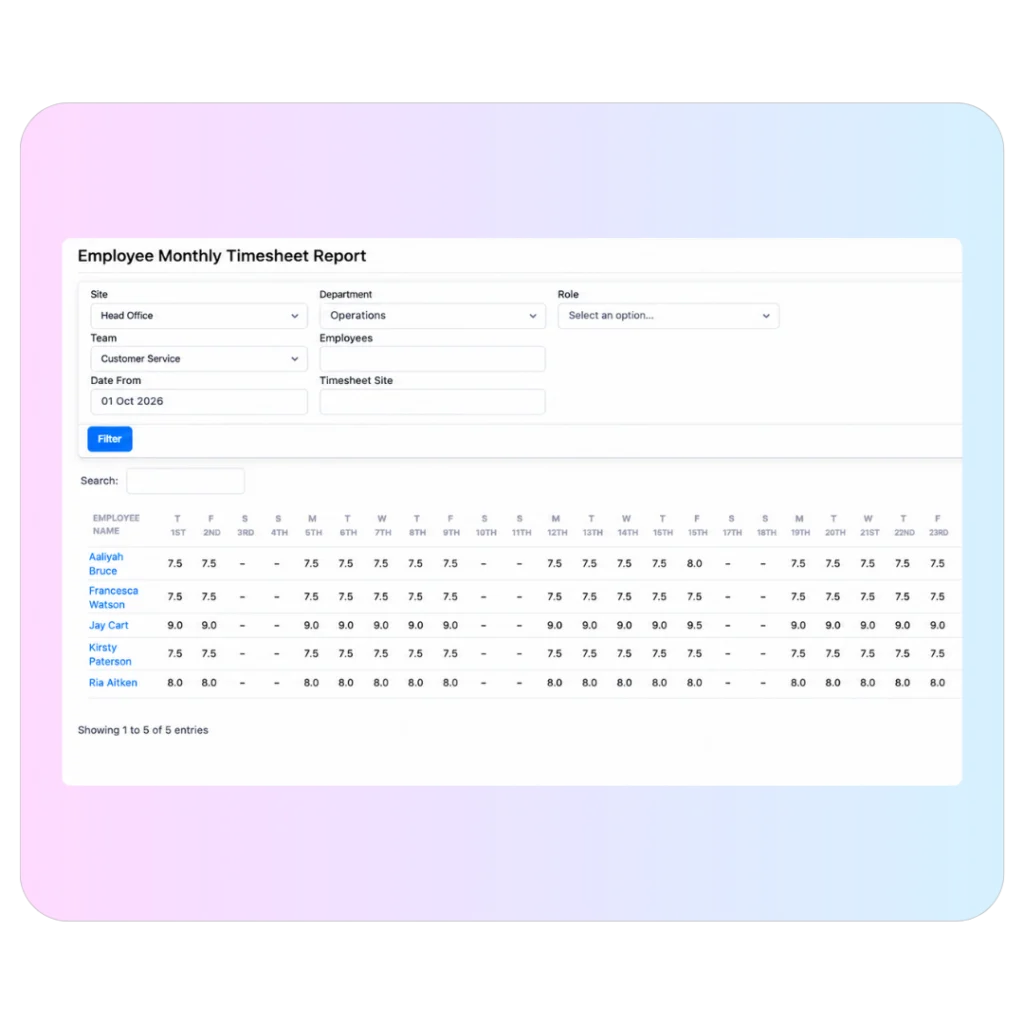
Stop building the hours picture by hand at the end of the month.
Review contracted versus actual hours, overtime, lateness, and attendance patterns by employee, team, site, or role, then drill into the entries behind the number.
- Compare planned and actual hours.
- Review overtime, lateness, and missed clockings.
- Filter by site, team, role, or employee.
- Give managers and payroll the view relevant to their responsibility.
See Evalu-8 in action
Book a demo with one of our specialists.