
Evalu-8 EHS software pricing
Build the EHS package your organisation actually needs.
Start with one connected safety management platform, then add risk assessments, RAMS, COSHH, incident reporting and audits as your organisation needs them.
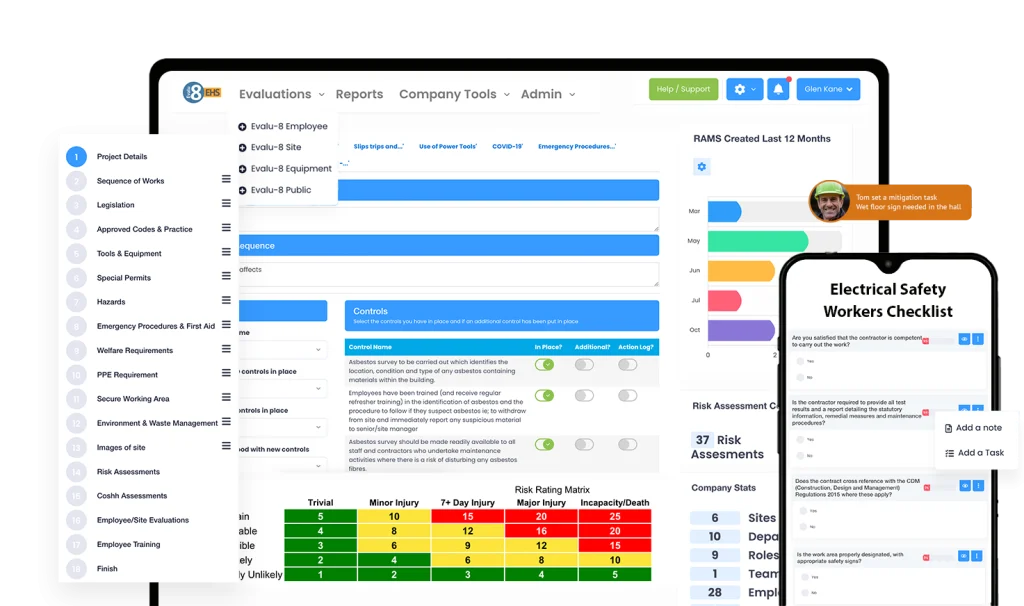
Build your EHS package
Start with the core. Add what you need.
Core EHS brings the essential everyday tools together. Choose the specialist modules that make sense for your operation, and see exactly what goes into your tailored package.
Core product
Always includedThe operational foundation included with every EHS package. Keep the people, records, recurring checks and management information that support day-to-day safety work in one connected place.
- Personnel
- Training
- Assets
- Contractors
- Documents
- Reporting
Risk Assessments
Create consistent, reusable risk assessments while retaining the detail needed for different sites, activities and jobs. Make reviews, ownership and communication part of the process.
- Hazard libraries
- Risk matrices
- Reviews
- Sign-off
RAMS & Method Statements
Build structured Risk Assessments and Method Statements (RAMS) around how a job will actually be carried out, then share the agreed method with the people doing the work.
- Method steps
- Controls
- Documents
- Sign-off
Accident & Incident Management
Make it straightforward to report accidents, incidents, near misses and hazards, then manage the investigation and actions with a complete record of what happened.
- Reporting
- Investigations
- Actions
- Trends
Audits, Inspections & Forms
Build your own digital inspections, audits, safety checks and operational forms. Capture field evidence, score results where appropriate and connect findings to owned corrective actions.
- Forms
- Scoring
- Offline
- Actions
COSHH Management
Bring your substance information, safety data sheets and COSHH assessments together, so teams can find control measures and keep reviews on schedule.
- Substances
- SDS
- Assessments
- Reviews
Full feature breakdown
See what’s included, not just a module name.
A complete, practical breakdown of the tools, records, workflows and reporting available in Core EHS and each specialist module. Select a module to explore its capabilities in depth.
Core EHS
Core EHS: full feature breakdown
The operational foundation included with every EHS package. Keep the people, records, recurring checks and management information that support day-to-day safety work in one connected place.
Core package
Organisation, personnel & permissions
Structure your data around how your organisation actually operates.
- Personnel profiles with role, team and contact details
- Multi-site, location, building and department structures
- Assign employees, contractors, assets and records to relevant locations
- Role- and module-based view, edit and administrative permissions
- Site, department and team-specific access to records
- Central oversight for group-level teams and focused views for local managers
Training & competency records
Move beyond an individual training spreadsheet.
- Store completed training, courses and qualification records
- Upload certificates and supporting evidence against personnel
- Identify training requirements by role, team or individual
- Training matrices to highlight completed, missing and expiring training
- Expiry and renewal dates with notifications and reminders
- Training histories and management reports
- Track competency information alongside the personnel record
Equipment & asset registers
Maintain traceable records for the equipment people rely on.
- Equipment and asset profiles with site, location and custodian
- Maintenance, service, inspection and calibration histories
- Attach manuals, certificates, service documents and images
- Schedule routine servicing and periodic checks
- Due-date reminders and visibility of overdue activity
- Record defects, faults and actions related to an asset
- See equipment information in dashboards and asset reports
Contractor profiles & documentation
Know who is working with you and keep their paperwork organised.
- Contractor organisation and contact profiles
- Collect insurance and relevant compliance documents
- Review document status, dates and supporting evidence
- Allow contractor document submission through supported workflows
- Keep induction and acknowledgement information alongside records
- Share site requirements and obtain digital sign-offs
- View contractor-related information by location or organisation
Controlled documents & electronic sign-off
Keep an accessible source of truth rather than a maze of folders.
- Organise documents in configurable libraries and categories
- Access and visibility permissions for relevant users
- Upload policies, procedures, method documents and supporting files
- Track document versions and revisions
- Set document review and expiry dates with reminders
- Digital acknowledgement and electronic signatures
- See who has received or signed relevant documentation
- Access document records from supported mobile workflows
Tasks, corrective actions & ownership
Translate a finding into an accountable next step.
- Create tasks and corrective or follow-up actions
- Assign responsible people, due dates and priorities
- Track open, overdue and completed actions
- Set recurring tasks and reminders
- Attach notes, photographs and completion evidence
- Review actions across teams, sites and individuals
- Maintain a history of activity and completion
Workflows & automation
Cut out repetitive chasing where the platform supports it.
- Configure notifications and automated reminders
- Route selected tasks or records to the right role
- Use due dates, statuses and triggers in supported processes
- Schedule repeating administrative and operational activities
- Support review, renewal and approval processes
- Maintain consistent processes across multiple locations
Dashboards & reporting
Turn the information you capture into management visibility.
- Configurable dashboards and moveable widgets
- Multiple dashboards for different operational roles
- Preset reports and a custom report builder
- Filter information by location, team, department and person
- View action, incident, training, asset and document data
- Identify outstanding activity and approaching deadlines
- Export reports for operational meetings and leadership reporting
- Power BI output and integration options subject to requirements
Visitors, resources & everyday operations
Practical tools that support a joined-up operation.
- Visitor registration, sign-in and roll-call information
- Company calendar and scheduled activities
- Resource booking and availability management
- Environmental aspects and impacts register
- Organisation-specific communications and timeline features
- Letter generation and reusable operational records
Mobile access, QR codes & traceability
Put information closer to the point where work happens.
- Mobile-friendly access to supported EHS records
- QR links to relevant locations, records or checks where configured
- Photograph and document evidence capture in supported workflows
- Digital signatures and acknowledgement records
- Audit trails and record histories
- Appropriate access controls for mobile and field teams
Risk Assessment
Risk Assessments: full feature breakdown
Create consistent, reusable risk assessments while retaining the detail needed for different sites, activities and jobs. Make reviews, ownership and communication part of the process.
Templates & libraries
Standardise common assessments without starting from scratch.
- Create reusable assessment templates
- Maintain a library of common hazards and control measures
- Adapt assessment content to activities, sites and teams
- Record the assessment owner and operational context
- Attach supporting information and photographs
Hazards, people & controls
Record the reasoning behind a risk decision.
- Describe the task, activity or area under assessment
- Identify hazards and people who may be affected
- Record existing precautions and additional controls
- Assign follow-up actions to responsible people
- Add contextual notes and supporting evidence
Risk scoring & matrices
Make assessment scores understandable and repeatable.
- Apply configurable risk rating matrices
- Record likelihood and severity where applicable
- Capture initial and residual risk ratings
- Demonstrate the effect of selected control measures
- Use a consistent approach across locations and activities
Review, approval & sign-off
Make assessments living records rather than static PDFs.
- Set ownership and scheduled review dates
- Trigger reminders for approaching review dates
- Update assessments when circumstances change
- Maintain document revisions and historical records
- Communicate assessments through supported sharing and acknowledgement
- Capture electronic sign-off when required
Visibility & follow-through
Help managers see what needs attention.
- Find assessments by site, team, activity or status
- See upcoming, overdue and completed reviews
- Connect resulting tasks with responsible people and deadlines
- Support audits with assessment evidence and history
- Include assessment activity in relevant reporting
RAMS
RAMS & Method Statements: full feature breakdown
Build structured Risk Assessments and Method Statements (RAMS) around how a job will actually be carried out, then share the agreed method with the people doing the work.
RAMS document builder
Create job-specific documents without repeatedly retyping standard content.
- Workflow-led RAMS and method statement creation
- Insert project, task and location information
- Describe sequenced work activities and safe methods
- Add personnel, equipment and operational requirements
- Attach supporting job documents where relevant
Hazards & control content
Capture relevant safety precautions within the method.
- Add hazards associated with individual work steps
- Reuse suitable hazard and control information
- Describe precautionary measures and PPE requirements
- Document risk scoring where configured
- Tailor controls to the task rather than rely only on generic wording
Document consistency & versioning
Reduce the chance of teams working from superseded instructions.
- Standardised headings and method statement layout
- Editable content for unique job circumstances
- Controlled revisions and updated document records
- Store approved versions with supporting materials
- Maintain a traceable history of changes and sign-off
Distribution & read-and-sign
Help teams confirm that they have seen the agreed method.
- Share relevant RAMS with affected workers
- Capture digital acknowledgement or signatures
- Retain evidence of who signed and when
- Make issued information accessible through supported mobile workflows
- Use permissions to control access to documents
Review & operational coordination
Keep methods aligned when the plan changes.
- Identify ownership for review and updates
- Revise RAMS when tasks or control measures change
- Support contractor and site-specific documentation processes
- Use supporting task and document workflows for outstanding actions
- Keep RAMS information linked to your broader EHS records
Accident & Incident Management
Accident & Incident Management: full feature breakdown
Make it straightforward to report accidents, incidents, near misses and hazards, then manage the investigation and actions with a complete record of what happened.
Event intake & reporting
Encourage timely and consistent recording.
- Report accidents, incidents, near misses and hazards
- Capture date, time, site, department and event details
- Record people involved and relevant witnesses
- Attach photographs, documents and supporting notes
- Use mobile and QR-initiated reporting where configured
- Use configurable fields to reflect your processes
Case management & investigation
Keep the event and its follow-up together.
- Maintain a case record for each event
- Assign responsibility for investigation and follow-up
- Record investigation notes and findings
- Capture relevant evidence and chronology
- Track case status through your workflow
- Retain records for later internal review
Corrective & preventive actions
Connect lessons learned to accountable work.
- Create actions arising from a report or investigation
- Assign action owners and target dates
- Send reminders for outstanding items
- Attach completion evidence
- See open and closed actions and maintain history
- Review recurring issues and emerging patterns
RIDDOR-related administration
Support the organisation of information relevant to reportable events.
- Record details relevant to statutory incident review
- Keep related evidence, dates and case documents together
- Support internal review and decision-making workflows
- Track responsibility for external reporting steps
- Retain an auditable history of the incident record
Dashboards & analysis
Understand more than just the total number of incidents.
- Review incident volumes and categories
- Filter reports by site, department and period
- Identify recurring event types and locations
- See outstanding case and action activity
- Produce management reports and exports
- Use trend information to inform future preventive work
Audits, Inspections & Forms
Audits, Inspections & Forms: full feature breakdown
Build your own digital inspections, audits, safety checks and operational forms. Capture field evidence, score results where appropriate and connect findings to owned corrective actions.
No-code forms & template builder
Make your forms match the way your organisation works.
- Create custom audit, inspection and operational checklists
- Build reusable question sets and form templates
- Use guidance notes to help users answer consistently
- Configure required questions and mandatory evidence
- Apply conditional logic to reveal relevant follow-up questions
- Create forms for safety audits, site checks and equipment inspections
Scoring, ratings & results
Give structured answers practical meaning.
- Rated questions and scored answers
- Weighted scoring to reflect question importance
- Calculate meaningful audit or inspection outcomes
- Flag poor-performing areas and failed questions
- Use scoring information for comparison and review
Scheduling & assignments
Make routine checks predictable.
- Schedule one-off and recurring inspections
- Assign audits to relevant users and operational teams
- Associate checks with sites, departments or assets
- Set dates, frequencies and responsibilities
- View due, completed and overdue inspections
- Support consistency across multi-site operations
Mobile, QR codes & offline
Complete checks where the work takes place.
- Complete supported forms on phones and tablets
- Offline inspection/form completion with later synchronisation
- Launch appropriate checks from configured QR codes
- Capture photos, annotations, notes and video evidence where supported
- Record signatures and sign-off
- Identify the asset, area or location being inspected
Findings & corrective actions
Avoid leaving issues buried in the completed form.
- Identify failures or non-conformances
- Create actions directly from failed or flagged responses
- Allocate an owner and due date
- Add supporting evidence or photographs
- Monitor work until it is marked complete
- Keep a record of findings and close-out evidence
Audit oversight & reporting
See trends beyond one completed inspection.
- Dashboards for inspection status and results
- Audit and inspection history by site, asset or area
- Filter records by date, team and inspection type
- Identify overdue checks and actions
- Export inspection information for reviews and meetings
- Compare activity and recurring findings across locations
Permits, checks & specialist workflows
Use configurable forms for other operational checks.
- Build permit-to-work forms around your process
- Configure pre-start, handover and close-out questions
- Create vehicle, machinery and equipment pre-use checks
- Set up housekeeping and workplace safety walks
- Add signatures, evidence and action tracking
- Use permissions and workflow controls appropriate to the form
COSHH
COSHH Management: full feature breakdown
Bring your substance information, safety data sheets and COSHH assessments together, so teams can find control measures and keep reviews on schedule.
Substance & chemical register
Make substance information discoverable.
- Create substance records with names and identifiers
- Associate chemicals with sites and work activities
- Store supplier and product details where recorded
- Attach safety data sheets (SDS)
- Search and retrieve substance records and documents
COSHH assessments
Record how substances are used and controlled.
- Assessment templates for workplace substances
- Describe the process, activity and routes of exposure
- Record relevant hazards and affected people
- Document control measures, safe use and storage
- Include PPE and operational precautions
- Add notes and evidence relevant to the assessment
SDS & related documents
Keep documentation with the assessment.
- Attach and maintain safety data sheets
- Store supporting technical or supplier information
- Control document access and record updates
- Keep substance information alongside associated assessments
- Share relevant information with authorised teams
Review dates & responsibility
Reduce missed reviews and outdated substance records.
- Assign assessment responsibility
- Set review and renewal dates
- Receive reminders of approaching deadlines
- Update records following changes to substances or processes
- Maintain revision and review evidence
Visibility & access
Make it easier to find what is used where.
- Search by substance, site or operational area
- View relevant records through supported mobile access
- Support manager oversight of review activity
- Export or report on substance and assessment information where available
- Link outstanding steps to normal task-management processes
Frequently Asked Questions
Are there training or storage costs?
Unlike other companies we do not charge for storage. Our clever team have created Evalu-8 to load and store data in such a way that we do not need to charge extra.
We also believe that training should come as standard with any software, as such we don’t charge additional monthly fees for it, it’s all covered in the one time set-up fee and you are entitled to as much training as you like with one of our experts.
Can Evalu-8 sync with other software?
Yes, we have an open API. This means our software can talk to any other software that also has an API.
How do you define a user of the system?
“User(s)” means the Client’s employees, representatives or consultants etc who have been added to the service and / or are authorised to use the Service and / or have been supplied user identifications (with or without a password), either by the Client; and this applies whether they log in to the system or not.